




FAQs - Frequently Asked Questions
Please see below for a list of frequently asked questions. You can also click on the the question below to see an answer.
- Where do you deliver to?
- Do you deliver to PO Boxes?
- Do you deliver to New Zealand, the US or UK?
- I forgot my password! How can I reset it?
QUESTION: Where do you deliver to?
We only deliver to AUSTRALIAN addresses only. NO PO Boxes.
Delivery
Standard shipping (after processing and dispatch expected delivery in 5-10 business days
*FREE Delivery for all orders $450 and over**!
$15.00 Flat Rate (TAS & NT $15.95) for all orders under $450** to anywhere in Australia.
**Excludes Furniture & Clearance Items
NOTE: Please provide a residential or work postal address as we do not ship to Parcel locker or PO Boxes. If you are located in a remote area, please provide an alternative shipping address within the nearest town centre as a signature is required on delivery. Freight rates may vary depending on the delivery location, product weight, size and price
Please note, all deliveries from Hobbysew will require a signature upon delivery.
For more information, please contact us on (02) 9831 2111 (Head Office) or emails us here.
Click here for more delivery information
QUESTION: Do you deliver to PO Boxes?
No we do not*, this is because we send via courier and require a signature on delivery.
*Exceptions apply to very remote areas and mining sites.
QUESTION: Do you deliver to New Zealand, the US or UK?
No, we only deliver to AUSTRALIAN addresses only.
QUESTION: I forgot my password! How can I reset it?
- You can reset your password by following these simple steps:
- Add any item to your shopping cart
- Go to your shopping cart
- Click on the "Checkout now" button (This will bring up a screen where you can login/enter your details.)

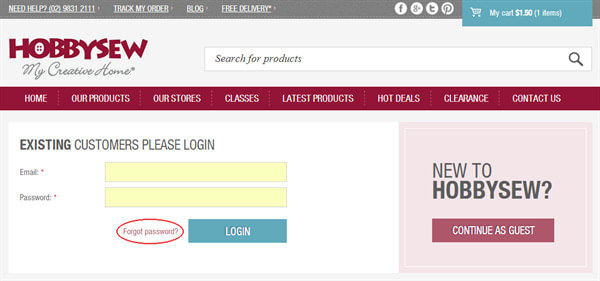
- Click on the "Forgot password?" link
- Enter your email address on this page and click the "Reset Password" button
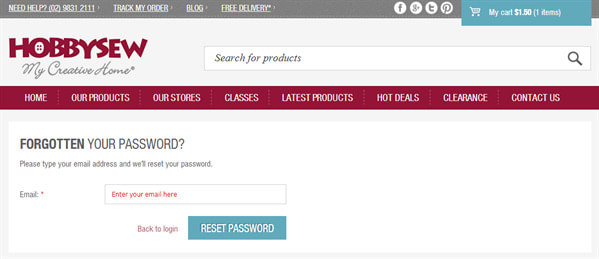
- You will then receive an email from us with a link to reset your password. Simply click on the link and follow the on-screen prompts to create your new password.